New feature
Realtime Composer Collaboration: no lost drafts, no duplicate replies
SamDesk keeps composer text persistent per agent and conversation while showing live typing context to teammates in the same thread. The result is cleaner collaboration and faster execution.
If you run support operations, your key questions are simple: will agents lose typed work, will teammates collide in the same conversation, and can we keep speed without creating internal noise? This feature answers those questions directly.
- Per-agent draft persistence: agents can switch context without losing typed work.
- Live teammate typing visibility in the same conversation.
- Less response overlap and fewer internal collisions.
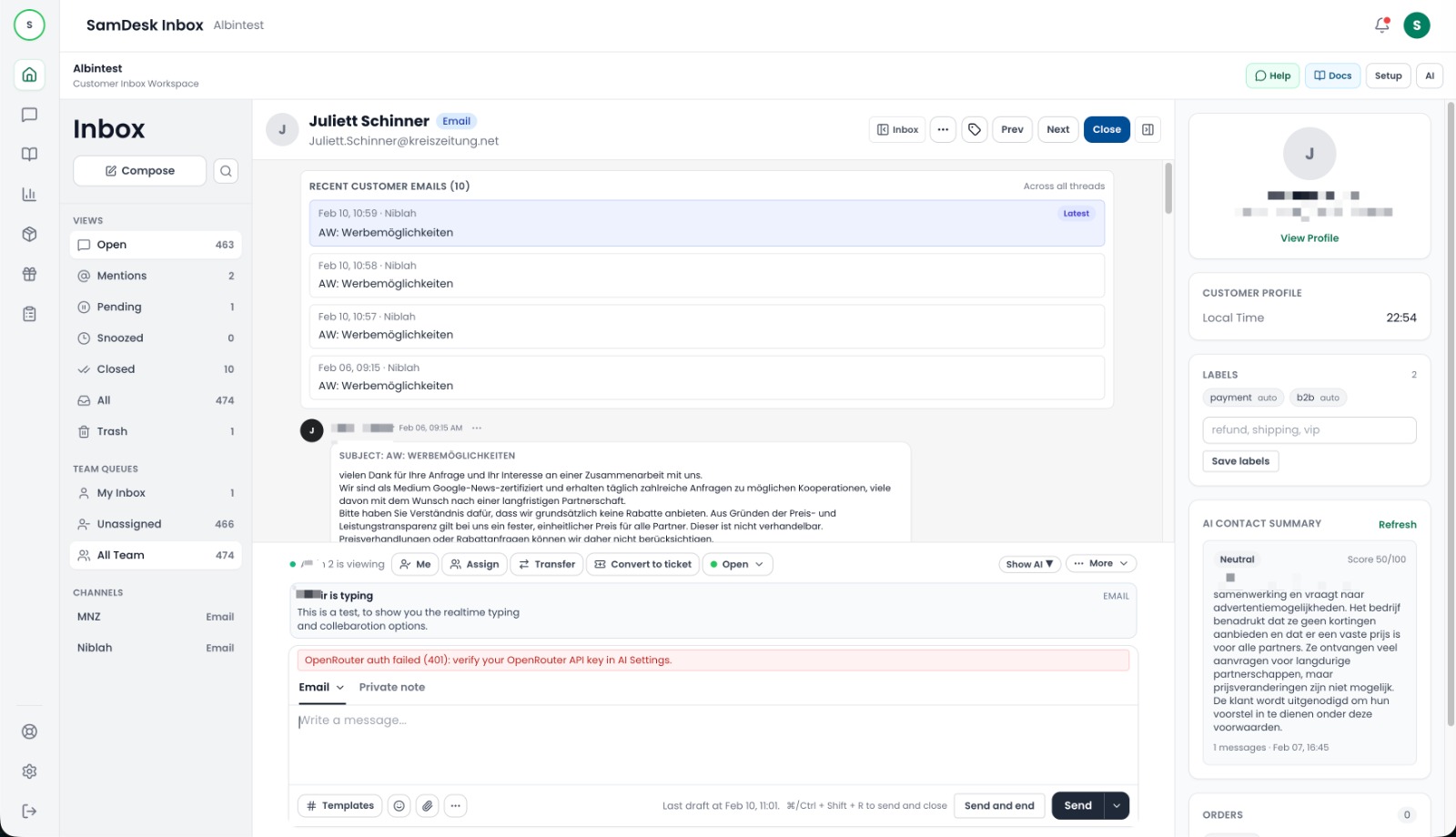
Video: realtime composer collaboration in action
This short demo shows how draft persistence and live typing visibility reduce overlap and speed up team execution.
What this demo covers
- How draft text is preserved per agent and conversation.
- How teammates see live typing presence in shared threads.
- How teams avoid duplicate replies and move faster.
Who gets immediate value from this
Support leads with high queue pressure
Reduce busy-hour chaos by showing clearly who is already composing a response.
Multi-shift support teams
Keep continuity across handoffs when agents move between conversations.
Operations and quality owners
Cut duplicate effort and increase execution clarity without adding extra tools.
How realtime composer collaboration works
1) Agent starts drafting
Composer text is autosaved locally per conversation and mode (email or private note).
2) Teammates see live typing context
Others in the same conversation can see who is typing and the direction of the draft, preventing parallel duplicate work.
3) Send now or resume later
Agents can return to saved text instantly, and local draft state is cleared cleanly after sending.
SamDesk realtime composer collaboration with live teammate typing context in inbox view
What this improves in your support KPIs
Less duplicate effort
Live typing context reduces overlap and avoids wasted drafting time.
Faster conversation throughput
Autosave prevents lost work during interruptions and keeps response flow moving.
Higher collaboration quality
Clear ownership signals reduce internal noise and improve consistency toward customers.
Practical support-team scenarios
Scenario: two agents open the same case
Typing visibility helps one agent continue the reply while the other supports with context, instead of creating conflicting responses.
Scenario: temporary context switch
An agent clicks away, returns, and continues exactly where they left off with no rewrite needed.
Scenario: internal private-note coordination
Persistence and live presence improve internal collaboration before customer-facing replies are sent.
Checklist for fast adoption
- ✓ Set a team norm: if typing is visible, coordinate instead of drafting in parallel.
- ✓ Train agents to use email vs. private-note mode intentionally.
- ✓ Prioritize this flow in high-volume and escalation queues.
- ✓ Track overlap reduction and first response speed during first rollout weeks.
- ✓ Include composer collaboration in new-agent onboarding.
Frequently asked questions your team will have
Is this hard to enable?
No. The collaboration behavior is integrated directly in the SamDesk composer experience.
Does it work for both reply and private-note workflows?
Yes. It is designed for both email replies and private notes.
Who can see typing content?
Only teammates in the same organization and conversation can see realtime typing context.
What happens if an agent switches conversations?
Draft text remains available for that conversation so the agent can resume quickly.
Will this break existing send and draft behavior?
No. It extends the existing composer flow with persistence and collaboration signals.
