Feature
Unified inbox for ecommerce support operations
SamDesk gives your team one operational workspace for email, chat, and customer context. Fewer tabs, cleaner handoffs, and faster support for order, return, and shipping questions.
This page is written for non-technical founders and support leads who need practical clarity: what this feature changes, where it creates value, and how to roll it out.
- Less context switching: conversations, tickets, and customer context in one view.
- Faster handling: clear status, priority, labels, and ownership controls.
- More consistent quality: better agent handoffs and fewer support mistakes.
Video: how the SamDesk unified inbox works
This short product demo shows exactly how support teams move faster with one operational inbox and clear ownership.
What this demo covers
- How new customer conversations land in one place for fast triage.
- How agents use context, status, priority, and labels in one workflow.
- How handoffs stay clean across teammates and shifts without losing context.
Best fit by business type
Shopify support teams
Use order context next to every conversation to resolve WISMO and returns faster.
WooCommerce shops
Run one clean workflow across inbox, tickets, and internal notes without tool sprawl.
D2C scale-ups
Scale support with clearer ownership and visibility across agents.
How it works in practice
1) Intake and triage
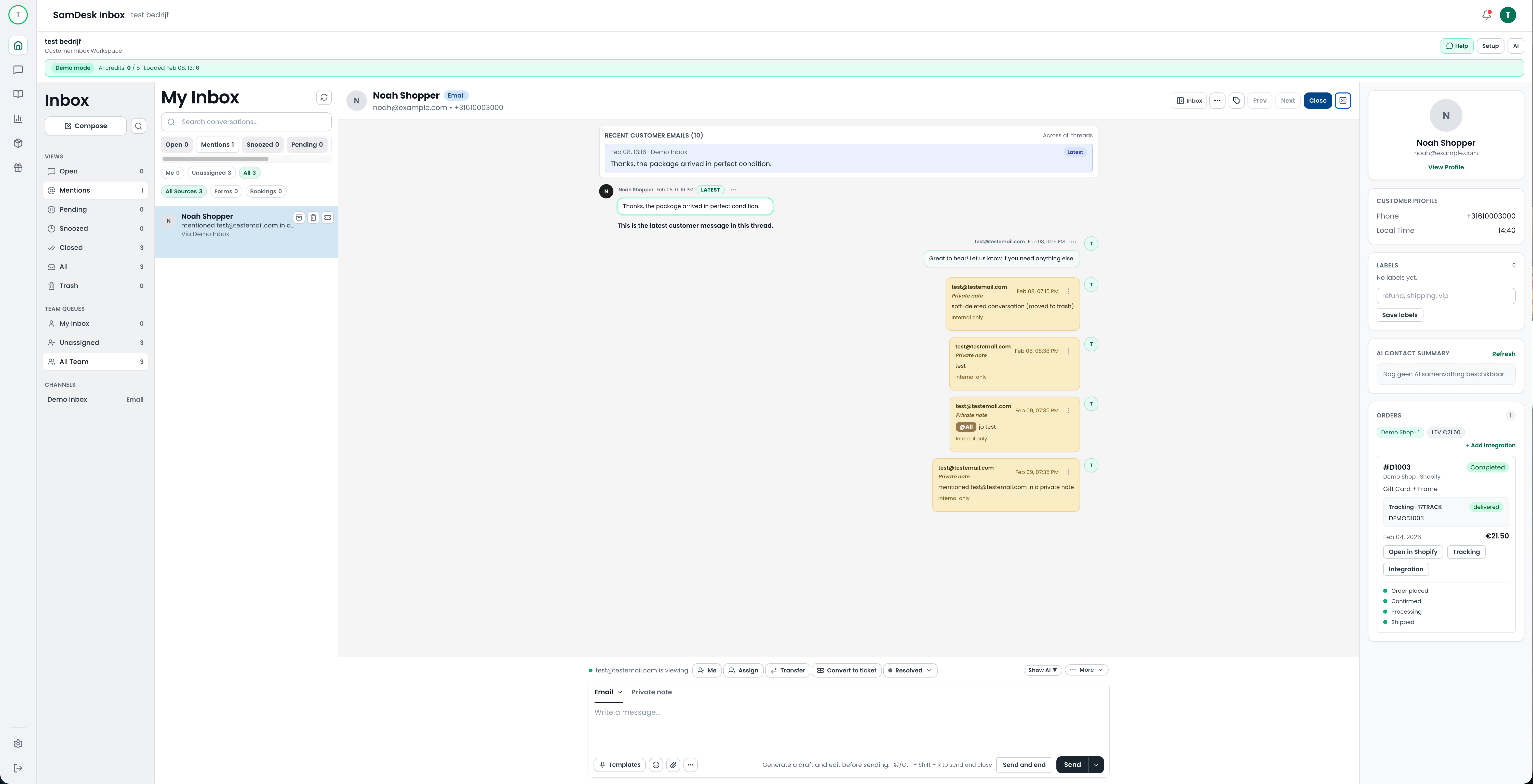
New messages land in one inbox where agents can filter by channel, priority, or customer type.
2) Context and action
Open the conversation, review order/customer context, add notes, and assign ownership.
3) Resolve and follow through
Close with the right status, link tickets when needed, and keep SLA discipline tight.
SamDesk unified inbox with filters, conversation list, and customer context
Expected support KPI impact
Faster first responses
One operational inbox reduces search time so agents can respond earlier.
Higher resolution speed
Conversation context and ownership controls reduce internal friction.
More consistent CX quality
Structured statuses and notes improve continuity across shifts.
Examples from real support workflows
Example: delayed shipment
Agent sees tracking context immediately, sends a precise update fast, and reduces escalation risk.
Example: return request
Internal notes and a standard workflow allow one-touch resolution for many return cases.
Example: shift handoff
The next agent picks up instantly with full context instead of re-investigating the case.
Implementation checklist
- ✓ Define routing and priority rules by channel.
- ✓ Set ownership and escalation criteria by ticket type.
- ✓ Create label conventions for recurring support patterns.
- ✓ Document internal notes standards for clean handoffs.
- ✓ Track weekly: first reply time, resolution time, and backlog trend.
Frequently asked questions
Is this useful for small teams?
Yes. Small teams gain speed quickly when all support operations are centralized.
Can we manage priority and ownership per conversation?
Yes. You can set status, priority, labels, and assignee per conversation.
Is this only for email?
No. The inbox is designed for multi-channel support with one consistent workflow.
