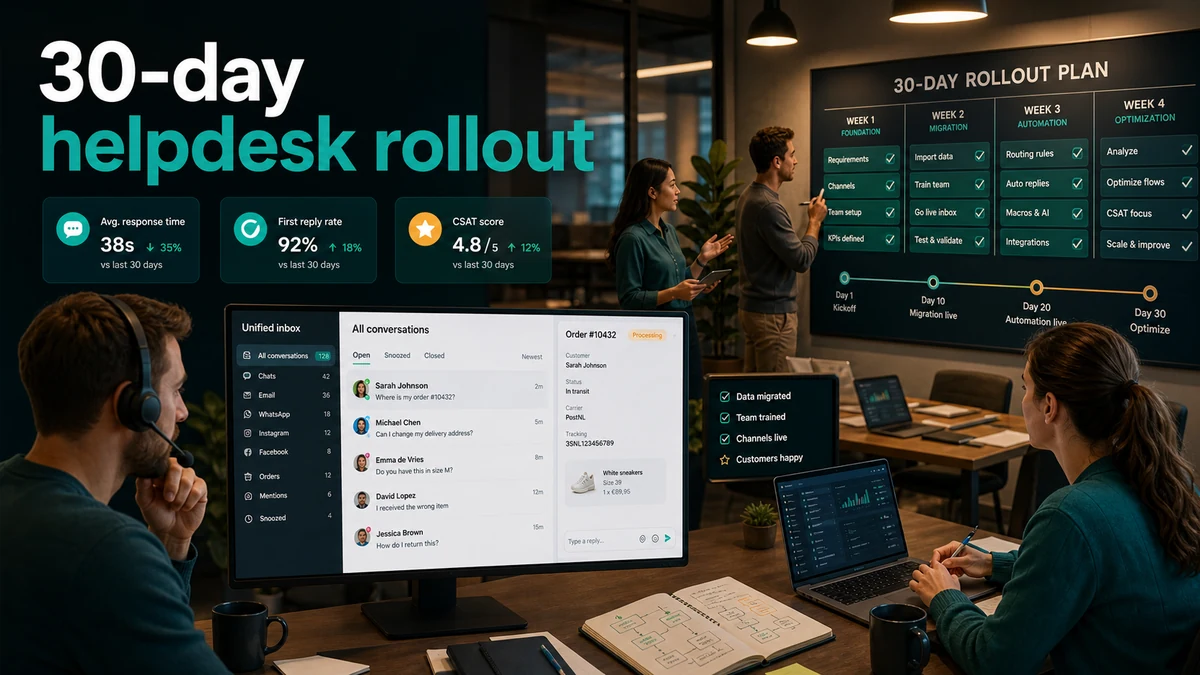
Ecommerce helpdesk implementation: a 30-day rollout plan without chaos
A practical 30-day rollout for ecommerce teams that want to unify email, chat, order context, and support workflows without disrupting daily operations.
Implementing an ecommerce helpdesk often looks like a tooling project. Create an account, connect an inbox, invite agents, done. In reality, it is an operations project. You are changing how customer questions arrive, who owns them, where order context appears, how escalations move, and which KPIs the team uses.
If you move too quickly, support gets messy. Agents search old emails in Gmail, chat remains in a separate tool, return requests get picked up twice, and nobody knows whether response time is actually improving. Not because the helpdesk is bad, but because the rollout had no sequence.
This 30-day plan gives you that sequence. It is built for ecommerce teams that want to bring email, live chat, order context, and ticket workflows together without disrupting daily support. It supports the broader unified inbox page and does not compete with a general migration checklist: this article is specifically about ecommerce rollout.
Days 1-5: define scope before migrating anything
The first mistake is starting too big. Teams want email, chat, social, returns, reviews, AI, templates, and reporting live at once. That feels decisive, but it makes diagnosis impossible. If something breaks, you do not know which part caused it.
Start with three decisions.
1. Which channels go live first? For most ecommerce teams, email is the safest starting point. It holds the most volume, the most history, and the lowest real-time pressure. Add live chat only after agents are comfortable in the new inbox.
2. Which order context must be visible? Minimum: order number, customer name, email address, order status, shipping status, payment status, and return status. Extra fields may be useful later. A crowded sidebar slows agents down.
3. Which workflows are release-critical? Choose five basic flows: new question, waiting for customer, waiting for internal team, resolved, and escalation. More statuses feel precise, but are rarely used consistently in week one.
Write a short scope note:
- Starting channel: email.
- Second channel: live chat after week two.
- Critical integration: Shopify or WooCommerce order context.
- Critical tags: order status, return, refund, complaint, product question.
- Release KPIs: first response time, open backlog, repeat contact.
Without that scope, you will probably build too much.
Days 6-10: migrate the inbox without losing the old inbox
Helpdesk implementation often fails on trust, not technology. Agents need confidence that messages are not disappearing. Customers should not notice the switch.
Use three layers.
Layer 1: forwarding or direct connection. Connect your support address through mailbox integration or forwarding. Test with internal emails before real customer questions arrive. Check sender name, reply-to, signature, and thread behavior.
Layer 2: old inbox as archive. Do not turn Gmail or Outlook off immediately. Use it as a read-only archive for the first weeks. Agents should no longer answer from the old inbox, but they can search it when historical context is missing.
Layer 3: daily reconciliation. During the first five working days, compare the number of messages received in the old inbox with the number of tickets in the helpdesk. If the numbers differ, fix it the same day. Do not wait until Friday.
A healthy migration feels boring. No big bang, no heroic night deployment, no mysterious sync problems. Just a controlled transition.
Days 11-15: add order context and keep it usable
Order context is why ecommerce teams should not settle for a generic helpdesk. An agent should see what was ordered, where the parcel is, whether payment succeeded, and whether a return already exists.
But order context must stay usable. Too many fields slow agents down.
Start with this sidebar:
- customer details
- last three orders
- current fulfillment status
- tracking link
- payment status
- return or refund status
- internal note for exceptions
Leave out anything that does not directly help answer the customer in version one. Product margins, campaign source, full order history, and marketing segments can come later. In week two, you want speed and confidence, not a data museum.
Test order context with ten real cases:
- customer asks where an order is
- customer wants to change address
- customer reports a damaged product
- customer asks about refund status
- customer asks whether a return was received
- customer has two recent orders
- customer emails from another address
- customer complained before
- customer asks a pre-sale question
- customer opens a second ticket about the same order
If agents can handle these ten cases without opening extra systems, your context layer is good enough for release.
Days 16-20: build routing and ownership
Routing does not need to be perfect in week three. It needs to stop tickets from floating.
Start with simple rules:
- Return questions to the return queue.
- Refund questions to a small group with payment context.
- Complaints to senior support or team lead.
- Product questions to general support.
- VIP or B2B customers to owner or account team.
Avoid complex automation before you have real patterns. A rule that handles 70% correctly and visibly fails is better than a complex rule nobody understands.
Also define ownership:
- Every open ticket has one owner.
- Every escalation has a next action and deadline.
- "Waiting on internal" cannot sit longer than 24 hours without update.
- Tickets are not closed without a clear closure message.
This is where many implementations win. Not through more features, but through less ambiguity.
Days 21-25: train agents on scenarios, not buttons
Tool training is often too technical: click here, filter there, tag this. Agents do not retain it well because it is disconnected from their real work.
Train on scenarios:
Scenario 1: WISMO question. Agent opens ticket, checks order status, uses shipping update template, sets checkpoint, and closes or schedules follow-up.
Scenario 2: refund status. Agent sees return and payment status, uses refund template, explains processing time, and sets owner for follow-up.
Scenario 3: complaint. Agent reads history, summarizes the issue, escalates with context, and prevents the customer from explaining everything again.
Scenario 4: live chat to ticket. Chat starts in real time, becomes complex, and turns into a ticket with summary, owner, and next step.
Let agents practice every flow twice with real or anonymized tickets. End with three agreements: when to tag, when to escalate, and when to close.
Days 26-30: validate with KPIs and decide what comes later
The final week is not about new features. It is about proof.
Measure:
- first response time
- open tickets
- tickets older than 24 hours
- repeat contact on order status, returns, and refunds
- percentage of tickets with owner
- escalations without next action
Do not compare everything to an ideal benchmark immediately. Compare against your own baseline. Was the old inbox slow but familiar? Was chat fast but disconnected? Was refund status the biggest repeat-contact driver? The first implementation month should show whether those specific problems are getting smaller.
Only then plan phase two:
- add live chat fully
- connect social channels
- activate AI draft replies
- connect knowledge base answers
- automate review requests after resolution
- refine reporting by queue
The best implementations do not feel "finished" after 30 days. They feel controllable.
Example: from loose inboxes to central operations
An ecommerce team with three agents handles 90 to 130 tickets per day. Before rollout, email lived in Gmail, live chat sat in a separate tool, and order status required opening Shopify. Agents switched tabs constantly.
The 30-day rollout looked like this:
- Week 1: scope limited to email and order context.
- Week 2: support address connected, old inbox read-only, daily reconciliation.
- Week 3: basic routing for returns, refunds, complaints, and product questions.
- Week 4: live chat added during business hours only, with complex chats routed as tickets.
The outcome was not full automation. The outcome was that every ticket had an owner, order context was visible, and the team could finally see where backlog started. That is the foundation for safe automation later.
Where SamDesk fits
SamDesk is built for this kind of rollout: inbox and customer context first, then routing, AI, and measurement. You do not need to use everything on day one. In fact, you should not.
Start with the unified inbox and Shopify/WooCommerce context. Add workflows, templates, and AI draft replies based on real ticket patterns. Use the ecommerce support improvement playbook to judge KPI changes after launch.
To plan the rollout for your store, review SamDesk pricing or book a short intro call.
Frequently asked questions
How long does ecommerce helpdesk implementation take?
A basic setup can happen in a few days, but a stable rollout with inbox migration, order context, routing, templates, team training, and KPI validation is better planned over 30 days.
Should every support channel migrate at once?
No. Start with email and order context, then add live chat or social channels. This prevents the team from learning a new tool and a new channel process at the same time.
What is the biggest implementation mistake?
Too much automation on day one. Start with visibility, ownership, and basic routing. Automate only after you have seen real ticket patterns.
Want to see SamDesk in action?
Schedule a personal demo and discover what SamDesk can do for your team.
Book a demo